
An invoice needs to be provided as a PDF, an order confirmation needs a new layout, or an additional language version is required for another company. The business data resides in SAP and is used to create a document that can be printed, delivered digitally, or processed further.
There are various ways to generate PDFs and forms from SAP. Adobe Forms has been a common approach for many years.
As the number of variants and changes increases, the requirements go beyond PDF generation. Central management of content, variants, and changes becomes increasingly important.
How are PDFs and forms generated from SAP?
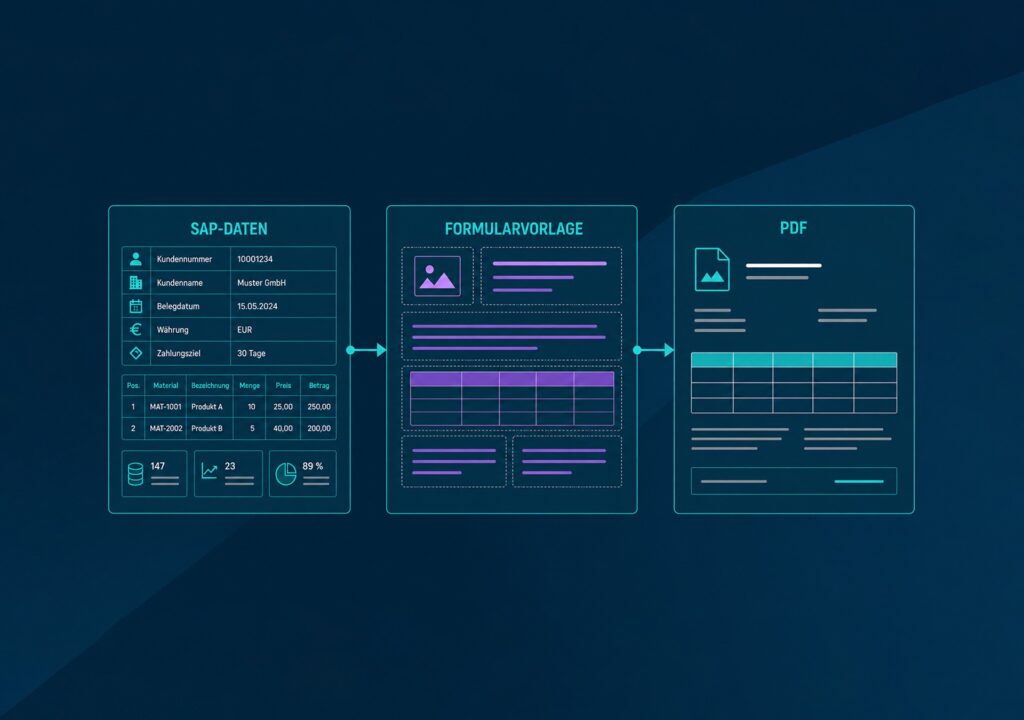
SAP provides the required data for a business document. The form template determines which content is included and how it is presented.
Depending on the use case, texts, data fields, tables, or layout variants can be incorporated. This is how invoices, purchase orders, delivery notes, or order confirmations are created from SAP data, for example.
What role does the form template play?
The template connects business data with the document structure. Among other things, it defines:
- Data fields and their position
- Texts and text blocks
- Tables and recurring sections
- Logos and design elements
- Conditions for certain content
- Page layout and formatting
For an invoice, SAP provides, for example, the recipient, invoice number, line items, and total amount. The form template determines which content is included and how it is presented.
Adobe Forms in the SAP environment
Adobe Forms is an established approach to form creation in SAP S/4HANA environments. Adobe Document Services combine the business data provided by SAP with the form template and handle document generation. This can be used, for example, to generate PDFs from SAP data.
Custom form templates can be created and adapted using Adobe LiveCycle Designer. In addition to on-premises deployment, SAP Forms Service by Adobe is available as a cloud service on SAP Business Technology Platform. The form template defines how the data is structured and presented in the final document. This includes elements such as layout, text, tables, images, and language variants.
What can be implemented with Adobe Forms?
Adobe Forms supports a wide range of requirements for SAP business documents. Data from SAP can be incorporated dynamically into forms, content can be controlled based on business data, and different layouts and language versions can be implemented.
This makes it possible to create both standardized documents and variants for different companies, markets, or use cases. Depending on the scenario, interactive forms can also be used alongside print forms.
Adobe Forms is therefore well suited to many form-generation requirements in SAP environments.
When requirements go beyond the form
As the number of variants increases, so does the effort required for maintenance and coordination. A change to required wording can quickly affect multiple templates. Even minor content changes may require SAP expertise and testing, depending on the form landscape. For business teams, the key question is which content they can maintain independently and when IT should be involved.
As additional data sources, business applications, or output channels are added, the requirements extend beyond form generation.
The key question then is which tasks remain in Adobe Forms and which can be handled more flexibly outside the SAP core.
Key considerations include:
- Frequency of changes to content and layouts
- Responsibilities for maintenance and updates
- Systems and output channels involved
Not every established form landscape requires a new approach. What matters is how effectively content, changes, and responsibilities can be managed within the existing environment.
When a decoupled approach can make sense
If more content is maintained outside the SAP core, centralized management and clearly defined responsibilities become more important.
This is where neeyo comes in.
SAP remains the primary business system and provides the business data. neeyo supports the centralized and flexible management of templates, content, and output and can be integrated into existing landscapes via SAP-certified interfaces.
A decoupled approach can be useful when companies want to:
- Decouple changes more effectively from SAP development
- Centrally manage content and language variants across multiple documents
- Enable business teams to maintain more content independently
- Reuse content across SAP and non-SAP systems
- Process high document volumes with high performance and scalability
- Manage print and digital channels together
This does not necessarily mean replacing existing Adobe Forms. Existing and new approaches can be used in parallel and developed further step by step.
More on the subject: Read our article „SAP Output Management: How SAP and neeyo work together“.